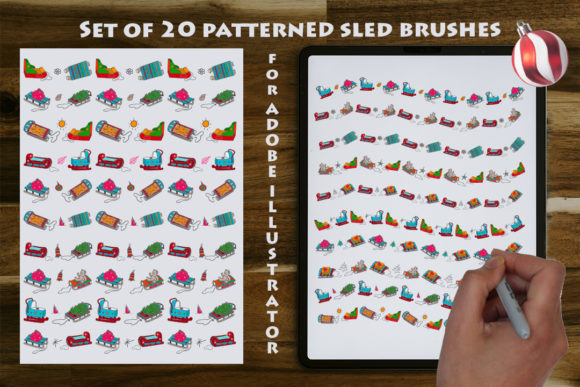
Set of 20 Patterned Sled Brushes
In the crowded marketplace of digital design assets, finding a resource that balances seasonal specificity with genuine workflow utility can be challenging. The Set of 20 Patterned Sled Brushes addresses this by offering a specialized collection of seamless art brushes tailored for Adobe Illustrator. Rather than providing static images that require manual scaling or rasterization, this toolset delivers vector-based flexibility designed to streamline the creation of holiday-themed graphics. For professionals and hobbyists alike, the value lies not just in the imagery itself, but in how these brushes integrate into an existing creative pipeline.
The core functionality of this set relies on the distinction between art brushes and standard patterns. When you apply one of these brushes to a path, it stretches and distorts to fit the curve, maintaining vector integrity throughout. This means a designer can draw a simple curved line to create a decorative border for a Christmas card, and the sleighs, toys, and ornaments will adjust their spacing and orientation automatically. This capability is particularly useful for creating custom wrapping paper, seamless borders for invitations, or organic layouts where rigid grid systems feel too restrictive.
Technical Compatibility and File Structure
One of the most practical aspects of this asset is its multi-format delivery. The primary file is optimized for Adobe Illustrator CC, ensuring full compatibility with modern features like global swatches and dynamic resizing. However, recognizing that many studios and freelancers still operate on legacy systems, the package includes an AI10 file for earlier versions of the software. Additionally, the inclusion of an EPS 10 format file expands the utility beyond the Adobe ecosystem, allowing users to import these brushes into other vector programs such as CorelDRAW or Affinity Designer.
This level of backward compatibility is often overlooked in digital product descriptions, yet it significantly impacts the long-term value of the purchase. A designer working in a corporate environment might be restricted to older software versions due to IT policies; having access to a compatible version ensures the asset remains usable regardless of the software update cycle. It demonstrates a thoughtful approach to product development that prioritizes user accessibility over forcing immediate software upgrades.
Workflow Integration and Adjustability
The term "seamless" in this context refers to the ability of the brush strokes to repeat without visible breaks when applied to a continuous path. In practice, this allows for the rapid generation of complex decorative elements. For instance, creating a header for a newsletter or a footer for a business card typically requires manually placing individual icons and adjusting their kerning. With the Set of 20 Patterned Sled Brushes, a designer can simply draw a horizontal line across the page, apply the brush, and instantly generate a uniform, repeating pattern of sleds and festive decorations.
The adjustable nature of these brushes via the Adobe Illustrator stroke panel is a critical feature. Users can modify the width, height, and even the angle of the brush tips without losing resolution. If a project requires a tighter cluster of toys or a more elongated sleigh, these parameters can be tweaked dynamically. This eliminates the need to return to the original source files or recreate elements from scratch, saving significant time during the iteration phase of a project. Furthermore, because the output remains vector, the final designs are crisp at any print size, from a small logo on a pen to a large-scale poster.
Practical Applications Across Industries
The versatility of these brushes extends well beyond simple holiday greetings. While the theme is explicitly winter and Christmas, the application range is broad enough to serve various professional needs.
- Marketing and Branding: Small business owners and marketers can quickly create seasonal social media graphics, email headers, and promotional banners. The ability to match brand colors by editing the brush attributes makes it easy to maintain visual consistency while adding festive flair.
- Print Production: Print designers can utilize the brushes to design packaging, gift tags, and custom stationery. The vector quality ensures that fine details remain sharp when printed on high-resolution stock.
- Textile and Product Design: Freelance illustrators working on T-shirt designs or fabric prints benefit from the seamless nature of the brushes. They can create repeating patterns for textiles or all-over prints for apparel without worrying about alignment errors.
- Event Planning: Educators and event organizers can use these tools to design personalized invitations, certificates, and classroom decorations. The ease of use allows for quick customization based on specific event themes.
It is important to note that these brushes are strictly for Adobe Illustrator and are not compatible with Photoshop. This distinction is crucial for users who might assume they can apply vector brushes directly within raster-based workflows. Attempting to use them in Photoshop would require conversion to smart objects or rasterization, which negates the primary benefits of scalability and editability. Users must ensure their software environment matches the requirements before purchasing.
Evaluation of Quality and Consistency
From an evaluation standpoint, the quality of vector assets often hinges on the cleanliness of the anchor points and the logical organization of layers. A well-constructed brush set should not only look good but also perform reliably under stress. The Set of 20 Patterned Sled Brushes appears to prioritize clean geometry, which translates to smoother curves and fewer artifacts when paths are manipulated. The inclusion of 20 distinct variations provides a sufficient variety to prevent visual monotony in larger projects.
Consistency is another key factor. In many brush sets, the scale of individual elements varies wildly, making it difficult to create balanced compositions. These brushes seem designed with a consistent visual weight, allowing different elements (such as a sled, a toy, and an ornament) to coexist harmoniously within the same design. This attention to detail suggests a higher level of craftsmanship compared to generic, low-effort clipart collections.
Considerations for Potential Buyers
While the asset offers significant advantages, there are limitations to consider. The thematic focus is strictly winter and Christmas-related. For designers working on year-round branding or projects unrelated to the holiday season, this set may have limited utility outside of specific campaigns. Additionally, the learning curve for mastering art brushes exists. Beginners who are unfamiliar with the concept of drawing paths and applying strokes may find the initial setup slightly less intuitive than simply dragging and dropping pre-made images.
However, for those familiar with Adobe Illustrator, the efficiency gains are substantial. The ability to change the color of an entire brush stroke with a single click is a powerful feature that streamlines the color correction process. Instead of selecting each individual icon to recolor, the user can simply change the stroke color of the path, updating the entire decorative element instantly.
Ultimately, the decision to acquire the Set of 20 Patterned Sled Brushes depends on the specific needs of the project and the user's current software stack. For professionals seeking to enhance their holiday design capabilities with high-quality, editable vector assets, this toolset represents a solid investment. It bridges the gap between static clipart and complex illustration, offering a middle ground that maximizes creativity while minimizing technical friction. Whether for a commercial client deadline or a personal crafting project, the flexibility provided by these brushes makes them a valuable addition to any digital toolbox.